BLOG ON
AI Document Processing for Finance and Operations
PUBLISHED ON - 23rd October, 2026 · 12 min read
PUBLISHED BY

Aditya Prem Sharma
Product Specialist
AI Document Processing for Finance and Operations
Your finance team receives 2,000 invoices every month.
Some arrive as PDFs. Others are scanned documents, email attachments, photographs, or spreadsheets. Every supplier has a different layout.
Employees open each document, find the invoice number, check the tax amount, enter the details into accounting software, and verify whether the payment has already been made.
The work is repetitive. But mistakes can be expensive.
A duplicate invoice might lead to a duplicate payment. An incorrect tax amount can create reconciliation problems. A missing purchase order can delay approvals.
Now imagine that most of the information is captured automatically, invoices are checked against purchase orders, and employees only need to investigate exceptions.
That's the business opportunity behind AI document processing.
AI document processing uses technologies such as OCR, machine learning, and language models to read documents, extract useful information, validate it, and support business workflows.
It's not simply about converting PDFs into text.
It's about reducing the manual work required to turn business documents into reliable, actionable information.
Important
The goal is not to remove humans from every financial decision. It's to automate repetitive document handling while retaining appropriate approval, verification, and audit controls.
And this is already happening in real businesses.
According to a published Microsoft customer story, Volvo Group saved more than 10,000 manual hours through document-processing automation.
Another company, Concentrix, reported processing 100,000 invoices per month using an AI-powered solution.
Let's examine what these systems actually do, where they create value, and how businesses can implement them without introducing unnecessary risk.
Why Manual Document Processing Gets Expensive
Document processing is one of those business activities that appears inexpensive when measured one document at a time.
Five minutes to enter an invoice doesn't sound significant.
But what happens when you receive 5,000 invoices every month?
The cost of five minutes
Consider a hypothetical finance team.
| Metric | Value |
|---|---|
| Documents processed monthly | 5,000 |
| Average manual handling time | 5 minutes |
| Total monthly effort | 417 hours |
| Estimated labor cost per hour | ₹350 |
| Monthly handling cost | ₹1.46 lakh |
| Annual handling cost | ₹17.5 lakh |
These are illustrative assumptions, not industry averages.
And they only account for initial handling time.
They don't include:
- Correcting data-entry mistakes
- Following up on missing information
- Resolving duplicate invoices
- Checking purchase orders
- Managing approval delays
- Reconciling payments
- Preparing audit documentation
What makes the process difficult?
Documents rarely arrive in one consistent format.
A business might receive an invoice from a large supplier with structured fields, followed by a scanned handwritten receipt from a local vendor.
Traditional automation can struggle when layouts change.
The business problem isn't simply reading text. It's understanding what the document contains and deciding what should happen next.
What AI Can Actually Do with Business Documents
AI document processing can support several activities that employees currently perform manually.
Identify the document
The system can classify incoming files as invoices, receipts, credit notes, purchase orders, contracts, or other document types.
Extract important information
For an invoice, the system might identify:
- Supplier name
- Invoice number
- Invoice date
- Purchase order reference
- GSTIN or other tax identifiers
- Line items and quantities
- Taxable amount
- Tax amounts
- Total payable amount
Validate extracted information
The system can check whether required fields are present and whether values follow expected formats.
For example, it might verify that the invoice total is consistent with the extracted line items and tax amounts.
Compare records
An invoice can be compared with an existing purchase order and goods receipt.
This is particularly useful for procurement and accounts payable workflows.
Route exceptions
If the invoice amount doesn't match the purchase order, the system can send it for human review.
Update business software
Once appropriate checks and approvals are complete, the validated information can be sent to an ERP, accounting system, or other business application.
Common use cases
| Document Type | Potential Automation |
|---|---|
| Supplier invoices | Extraction, matching, approval routing |
| Employee receipts | Expense categorization and validation |
| Purchase orders | Order detail capture and reconciliation |
| Bank statements | Transaction extraction and matching |
| Contracts | Clause identification and metadata extraction |
| Shipping documents | Delivery and shipment data capture |
| Insurance claims | Document classification and claim validation |
| Customer onboarding forms | Information extraction and verification |
The best starting point is usually a high-volume workflow with repetitive steps and clearly defined validation rules.
OCR vs AI Document Processing
Businesses often confuse OCR with intelligent document processing.
They're related, but they aren't the same.
OCR (Optical Character Recognition) converts text in images or scanned documents into machine-readable text.
AI document processing goes further by interpreting the document's structure and extracting information relevant to a business workflow.
Example: Reading an invoice
A traditional OCR system might extract:
"Invoice No. INV-2045, Total ₹58,000, Date 12 October 2026."
An AI document processing system can attempt to identify these values as structured fields:
- Invoice number: INV-2045
- Invoice date: 12 October 2026
- Total amount: ₹58,000
It can then pass the extracted fields through validation rules and matching processes.
Comparison
| Capability | Traditional OCR | AI Document Processing |
|---|---|---|
| Read printed text | Yes | Yes |
| Extract structured fields | Requires additional rules | Supported |
| Handle varying layouts | Often limited | More flexible |
| Classify documents | Requires additional logic | Supported |
| Interpret complex tables | Limited or tool-dependent | Often stronger |
| Validate business rules | Separate system needed | Integrated workflow possible |
| Connect to ERP | Requires integration | Requires integration |
AI isn't guaranteed to extract every field correctly.
Poor scans, unusual layouts, handwriting, ambiguous values, and complex tables can still cause errors.
Financial documents should be validated before extracted data is trusted for payments, accounting entries, or compliance decisions.
Real Case Studies: AI Document Automation
The value of document automation becomes clearer when examining actual implementations.
The following are publicly documented customer examples, not Software Studio Pro projects.
Case Study 1: Volvo Group
Industry: Automotive and manufacturing
Challenge: Processing invoices, credit notes, and other documents arriving in different formats and languages.
Volvo Group needed to extract information from scanned PDFs, emails, photographs, stamps, and documents containing complex tables.
The company implemented a solution using Microsoft Azure AI services and Azure AI Document Intelligence.
Published results
<text></text>
- 10,000+ manual hours saved
- Approximately 850+ manual hours saved per month
- Six-week proof of concept
- Four-month production implementation timeline
The system also supported document preprocessing, translation, and integration with downstream applications.
What businesses can learn: Document automation is especially useful when large volumes of inconsistent documents must be converted into structured information.
Case Study 2: Concentrix
Industry: Business process services
Challenge: Processing utility invoices from more than 100 providers with hundreds of document layouts.
Concentrix built an intelligent document processing solution using Microsoft Power Platform and AI-based extraction.
Its existing extraction approach struggled with the variation in invoice formats.
Published results
- Approximately 100,000 invoices processed monthly
- Extraction accuracy improved from around 65–70% to over 96%
- Accuracy reached 99% in January 2026
- Reduced the need for manual document-pattern maintenance
The reported accuracy measures extraction performance in Concentrix's workflow. It should not be interpreted as a universal accuracy guarantee for AI document processing.
What businesses can learn: Automation performance depends heavily on document variation, testing, and exception management.
Case Study 3: FibroGen
Industry: Biotechnology
Challenge: A small accounts payable team manually processing approximately 1,000 supplier invoices each month.
Despite implementing SAP, FibroGen still relied on employees to read invoice attachments and enter information manually.
The company adopted Google Cloud Document AI to automate invoice extraction and support SAP processing.
Published results
- Approximately 1,000 invoices per month
- Implementation completed in under three months
- Estimated solution running cost of $150 per month
- Projected 40x return on investment
The 40x figure was an estimated ROI, based on anticipated time savings, not a guaranteed realized financial return.
What businesses can learn: You don't need to process hundreds of thousands of documents to justify a focused automation project.
What these cases have in common
All three organizations targeted a specific operational bottleneck.
They didn't begin by trying to automate every business process.
They identified repetitive document work, introduced extraction and validation capabilities, and connected the results to existing systems.
The strongest automation projects start with a measurable business problem, not a requirement to use AI everywhere.
How an AI Document Workflow Operates
A useful document automation system needs more than an AI model.
It needs a reliable workflow around the model.
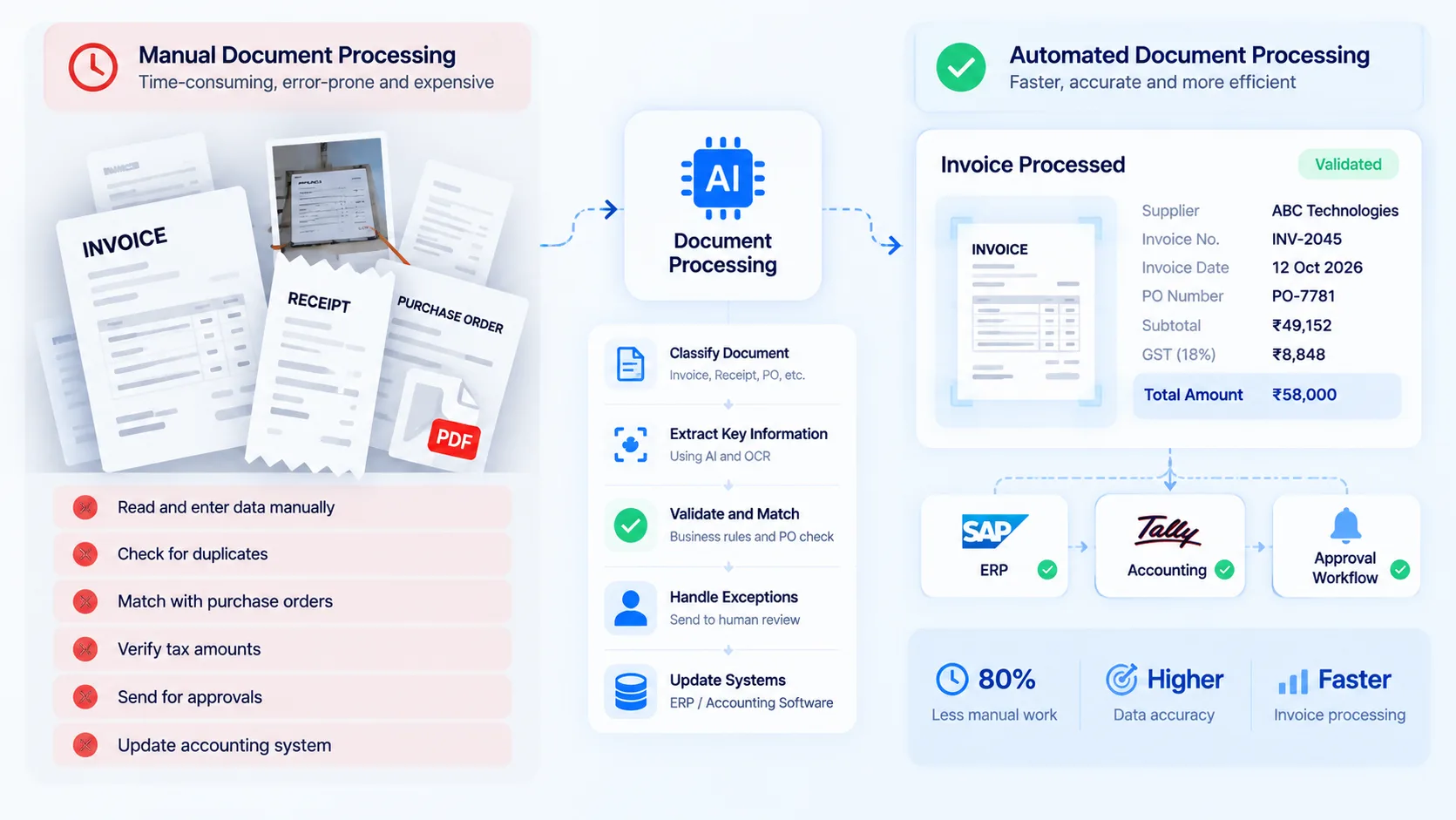
A typical invoice-processing journey
Step 1: Receive documents
Invoices may arrive through email, uploads, shared folders, or integrations.
The system records the original document and its source.
Step 2: Extract information
An AI document processing service identifies relevant fields and tables.
Step 3: Validate information
Business rules check the extracted information.
For example:
- Is the invoice number present?
- Does the supplier exist in the ERP?
- Is the invoice already recorded?
- Does the amount match the purchase order?
- Are the tax values consistent?
- Is the document readable enough to process?
Step 4: Handle exceptions
Documents that fail checks are sent to an authorized employee.
The employee can correct extracted fields, request clarification, or reject the document.
Step 5: Complete the workflow
Validated and approved information is transferred to the relevant business system.
Step 6: Record what happened
The system maintains a history of document processing, corrections, approvals, and integration outcomes.
This is particularly important for finance and compliance-related workflows.
Why human review matters
A system might extract an invoice amount correctly but fail to recognize that the document is a duplicate.
Another invoice might match a purchase order but contain an unexpected bank account change.
Extraction accuracy and payment authorization are different problems.
Businesses should maintain approval policies, segregation of duties, and appropriate verification for sensitive changes.
Where AI Document Processing Creates ROI
Time savings are the most obvious benefit, but they aren't the only one.
Faster processing
Employees spend less time reading and entering repetitive information.
Reduced correction work
Validation rules can catch missing fields, mismatches, and potential duplicates before information reaches downstream systems.
Better visibility
Finance teams can track documents awaiting approval, invoices with exceptions, and processing backlogs.
More scalable operations
A business can process growing document volumes without increasing manual handling effort at the same rate.
Improved employee productivity
Employees can focus on supplier disputes, financial analysis, approvals, and exception resolution.
Calculate your potential savings
Consider a hypothetical company processing 8,000 documents monthly.
| Metric | Before Automation | After Automation |
|---|---|---|
| Monthly documents | 8,000 | 8,000 |
| Average human handling time | 6 minutes | 2 minutes |
| Monthly human effort | 800 hours | 267 hours |
| Monthly labor cost at ₹350/hour | ₹2.80 lakh | ₹0.93 lakh |
| Potential monthly labor capacity released | ₹1.87 lakh |
This illustration assumes an average reduction in human handling time from six minutes to two minutes.
It does not include software subscriptions, implementation, AI usage, cloud infrastructure, or ongoing maintenance.
It also represents potential labor capacity released, not guaranteed cash savings.
If employees are reassigned rather than removed, the benefit may appear as increased capacity rather than lower payroll expense.
A better ROI formula
Annual net benefit = Annual operating savings + other measurable benefits - annual operating costs - annualized implementation costs
The calculation should also account for:
- Human review rates
- AI extraction errors
- Cost per processed document
- Integration maintenance
- Software licensing
- Cloud and API charges
- Audit and compliance requirements
Tip
Measure cost per successfully processed document, not just AI cost per page. A cheap extraction service can become expensive if employees must correct a large percentage of its output.
Security and Accuracy: What Can Go Wrong?
Financial documents often contain confidential information.
Invoices may include bank account details, supplier addresses, tax identifiers, contract references, and commercially sensitive prices.
Before implementing AI document processing, businesses should evaluate both security and operational risks.
Common risks
| Risk | Recommended Control |
|---|---|
| Incorrect extracted amounts | Validation and approval thresholds |
| Duplicate invoices | Duplicate detection and reconciliation |
| Unauthorized document access | Role-based permissions |
| Sensitive information exposure | Encryption and access controls |
| Unreliable AI output | Testing and human exception review |
| Incorrect ERP entries | Controlled integration and transaction logging |
| Missing processing history | Audit logs and retention policies |
| Supplier bank detail changes | Independent verification and approval |
What about compliance?
The requirements depend on the business, geography, and type of information processed.
For Indian businesses, GST-related invoice data and financial records may require particular attention to applicable tax and recordkeeping obligations.
Companies operating internationally may also need to consider privacy laws, data residency, contractual requirements, and industry-specific controls.
Using an AI service does not automatically make a workflow compliant.
Your implementation must address the actual obligations relevant to your organization.
Questions to ask vendors
- Where are documents processed and stored?
- Is customer data used to train models?
- How long are documents retained?
- Can we restrict access by department or role?
- How are processing errors handled?
- Can employees trace extracted values to original documents?
- Are approval actions logged?
- Can we export or delete data according to policy?
These questions matter as much as extraction accuracy.
Buy a Tool or Build a Custom Solution?
There are two broad approaches to AI document processing.
You can adopt an existing product, or develop a custom workflow using document AI services and your own business logic.
When an existing tool is enough
A ready-made solution may work well when:
- Documents follow common formats.
- Your accounting or ERP system has supported integrations.
- Approval workflows are relatively standard.
- Your team can work within the vendor's configuration options.
When custom development makes sense
Custom development becomes more attractive when:
- Multiple departments use different systems.
- Documents require specialized validation.
- You need complex purchase order matching.
- Your ERP has limited integration options.
- Your workflow involves several approval stages.
- You process industry-specific documents.
- You need a unified portal for document handling.
- Existing tools require excessive manual workarounds.
Comparison
| Factor | Ready-Made Tool | Custom Solution |
|---|---|---|
| Initial setup | Often faster | Requires development |
| Standard document types | Usually supported | Supported through selected services |
| Custom validation rules | Product-dependent | Highly configurable |
| ERP integrations | Limited to supported options | Can be developed |
| Workflow flexibility | Vendor-dependent | Greater control |
| Initial investment | Often lower | Typically higher |
| Long-term operating costs | Subscription and usage fees | Hosting, AI usage, maintenance |
| Ownership of workflow logic | Vendor-dependent | Greater business control |
A practical hybrid approach
You don't necessarily need to build your own AI model.
A custom application can use established document AI services for extraction while keeping validation, approvals, ERP integrations, reporting, and user experience under your control.
This often provides a practical balance between implementation speed and flexibility.
AI Document Processing Development Cost
The development cost depends on document types, integration requirements, workflow complexity, security needs, and expected volume.
The following are illustrative 2026 project-planning estimates for Indian businesses, not verified market averages or fixed SSP quotations.
| Solution Scope | Indicative Budget |
|---|---|
| Basic invoice extraction and export | ₹3–6 lakh |
| Invoice automation with approval workflow | ₹6–12 lakh |
| ERP-integrated document processing platform | ₹12–25 lakh |
| Multi-department document automation | ₹25–50 lakh |
| Complex enterprise document platform | ₹50 lakh+ |
What drives the budget?
Document complexity: Standard invoices are generally easier to support than mixed contracts, forms, handwritten records, and multi-page tables.
Integration requirements: Connecting to SAP, Microsoft Dynamics, Tally, custom ERP systems, or legacy applications can require different levels of effort.
Approval workflows: Multi-stage approvals, exception queues, and financial controls add functionality.
Document volume: Higher volumes may require more robust processing, monitoring, and infrastructure.
Security requirements: Enterprise access controls, auditability, retention policies, and regional hosting can increase complexity.
A sensible implementation plan
First 2 weeks: Discovery
Identify the document types, current processing steps, exceptions, and measurable goals.
Weeks 3–5: Pilot
Test a representative sample of real documents, including poor-quality scans and unusual formats.
Weeks 6–9: Workflow integration
Introduce validation, human review, approvals, and integration with the target business system.
Weeks 10–12: Production preparation
Test reliability, security, monitoring, and error handling before expanding usage.
This is an illustrative schedule for a focused project, not a guaranteed delivery timeline.
What should you measure during the pilot?
- Field-level extraction accuracy
- Percentage of documents requiring human review
- Processing time per document
- Cost per successfully processed document
- Duplicate detection effectiveness
- ERP integration success rate
- Number of unresolved exceptions
A pilot should demonstrate business value before you commit to automating every document type.
How Software Studio Pro Can Help
Your business probably doesn't need another dashboard that simply displays uploaded documents.
It needs a system that reduces manual work, connects with existing applications, and keeps financial decisions under control.
At Software Studio Pro, we develop custom software, AI-powered applications, internal business tools, and enterprise integrations.
We can help you build an AI document processing solution around your existing operations.
What we can develop
AI document extraction
Capture structured information from invoices, receipts, purchase orders, forms, and other supported document types.
Custom approval workflows
Create review queues, multi-level approvals, exception handling, and role-based access.
ERP and accounting integrations
Connect extracted and validated information with existing business software through available APIs and integration methods.
Document management dashboards
Track document status, processing times, exceptions, and approval bottlenecks.
AI-assisted validation
Combine extraction services with business rules and appropriate human verification.
Cloud infrastructure and maintenance
Deploy, monitor, maintain, and improve the solution as document volumes grow.
Start with one process
A useful first project might be automating supplier invoice entry for one finance team.
Once the workflow demonstrates reliable results, the same platform can be expanded to purchase orders, receipts, contracts, or other operational documents.
The objective is not to automate everything immediately. It's to eliminate a costly, repetitive workflow and build from there.
If your finance or operations team spends too much time manually processing documents, we can help evaluate the workflow and design a practical automation solution.
FAQ
What is AI document processing?
AI document processing uses OCR, machine learning, and other AI technologies to extract information from documents and support validation, classification, and business workflows.
Can AI automatically process invoices?
Yes. AI can extract invoice information, check selected fields, identify exceptions, and support integration with accounting or ERP software. Appropriate financial controls are still necessary.
What is the difference between OCR and AI?
OCR reads text from images and scanned documents. AI document processing can also interpret layouts, identify relevant fields, classify documents, and support more complex workflows.
Can AI document processing integrate with SAP?
Yes, depending on the SAP environment, available interfaces, and integration requirements. Similar integrations may be possible with other ERP and accounting systems.
Is AI document extraction 100% accurate?
No. Accuracy varies with document quality, format, model performance, and the fields being extracted. Important financial information should be validated.
Can AI process handwritten documents?
Some systems support handwriting recognition, but results depend on handwriting quality, language, image clarity, and the extraction service.
How much does AI invoice processing cost?
Costs depend on the software, document volume, extraction service, integration requirements, and human review effort. Custom development projects in India may begin around ₹3–6 lakh for focused solutions, based on illustrative planning estimates.
How long does implementation take?
A focused pilot may take several weeks. Production implementations with ERP integration, approvals, and security requirements can take several months.
Is custom AI document processing better than SaaS tools?
Not always. Standard workflows may be served well by existing products. Custom solutions are more useful when businesses need specialized rules, integrations, and operational control.
What documents can AI process?
Common examples include invoices, receipts, purchase orders, contracts, bank statements, shipping documents, claims, and onboarding forms.
Does AI document processing replace finance employees?
It can reduce repetitive handling work, but employees remain important for exceptions, approvals, financial judgment, reconciliation, and compliance.
How should a business start with AI automation?
Choose a high-volume document workflow, measure current processing effort, test representative documents, validate extraction quality, and implement a controlled pilot before scaling.
Ready to bring your business idea to life? Contact us today and let's build something amazing together!
Contact Us
READ MORE BLOGS
Building AI Agents That Work Inside Enterprise Software
Published on - 23rd October, 2026
Legacy ERP Modernization Without Replacing Everything
Published on - 23rd October, 2026
Custom B2B Procurement Portal Development
Published on - 23rd October, 2026
Multi-Tenant SaaS Architecture for Enterprise Products
Published on - 23rd October, 2026
Unified Data Platform for Multi-Branch Businesses
Published on - 23rd October, 2026