BLOG ON
Custom Legal Case Management Software: A Practical Guide
PUBLISHED ON - 28th October, 2026 · 9 min read
PUBLISHED BY

Aditya Prem Sharma
Product Specialist
The Most Expensive Problem Isn't Your Software
It's the information your firm cannot find when it matters.
A client calls asking about the next hearing. The associate handling the case is unavailable. The hearing date is in someone's personal calendar, the latest filing is attached to an email, and the billing details are in a separate spreadsheet.
Nobody has lost the case file.
But nobody has a complete picture of it either.
For a law firm, this creates more than inconvenience. It introduces operational risk, slows down client communication, and makes it harder for partners to understand how work is progressing.
Custom legal case management software solves this by organizing matters, documents, responsibilities, deadlines, communications, and financial records around a single case.
However, not every law firm needs to build its own platform.
The more useful question is:
Which parts of your firm's operations are genuinely different enough to justify custom software?
Your case management system should preserve institutional knowledge, not depend on one employee remembering where everything is.
This guide will help you answer that question before investing in development.
Run This 10-Minute Practice Audit
Before looking at software vendors, review how your firm currently works.
Mark the statements that apply.
- Included: We maintain case details in multiple spreadsheets.
- Included: Hearing dates or deadlines are tracked in personal calendars.
- Included: Finding the latest version of a document takes unnecessary time.
- Included: Clients regularly contact us for basic case updates.
- Included: Partners cannot quickly see which matters are overdue.
- Included: Time entries are recorded long after work is completed.
- Included: New employees need colleagues to explain where information is stored.
- Included: Our current software doesn't match our approval process.
- Included: Different practice areas require significantly different workflows.
- Included: We repeatedly copy information between disconnected applications.
What your answers suggest
0–2 items: Start by improving procedures or configuring your existing software.
3–5 items: A modern practice management platform or targeted automation may help.
6 or more items: Your firm may benefit from a broader workflow redesign, potentially including custom software.
These are practical screening guidelines, not validated industry benchmarks.
The purpose is to identify operational friction before spending money on technology.
Tip
Ask a partner, an associate, and an administrative employee to complete the audit independently. Differences in their answers often reveal problems that management doesn't see.
What Should a Matter Record Actually Contain?
Imagine opening a case and immediately seeing everything required to manage it.
Not twenty tabs. Not a collection of disconnected documents.
One structured matter workspace.
| Area | Information Available |
|---|---|
| Matter overview | Client, case reference, practice area, status |
| People | Responsible lawyer, team, parties, contacts |
| Deadlines | Hearings, filings, internal review dates |
| Documents | Pleadings, evidence, agreements, correspondence |
| Activities | Tasks, meetings, calls, notes |
| Financials | Time entries, expenses, invoices, payments |
| History | Important changes and responsible users |
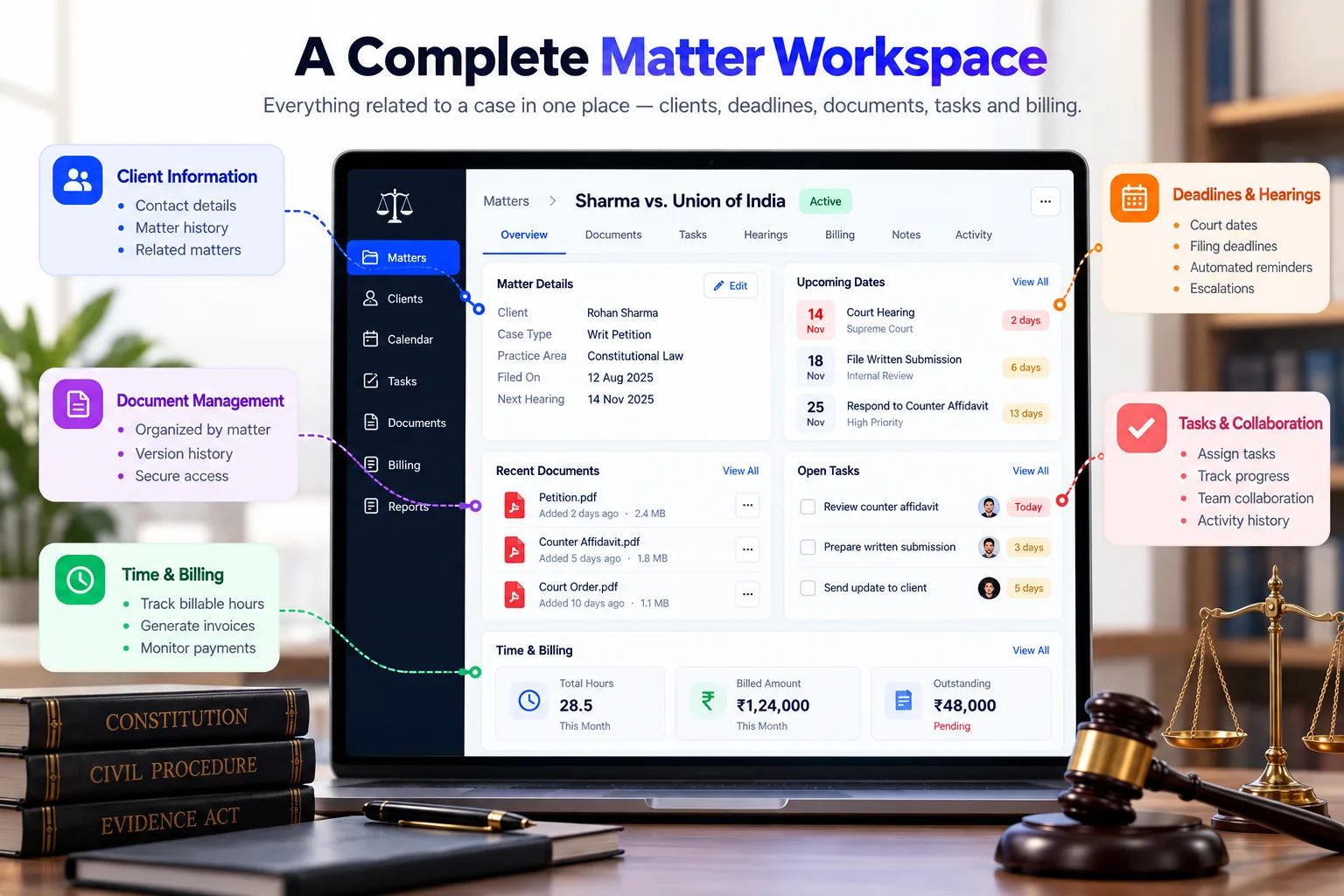
A matter workspace should also make relationships clear.
A document belongs to a matter. A task belongs to a responsible person. A deadline has a source and a review process. An invoice relates to recorded work or an agreed fee arrangement.
Don't confuse document storage with case management
Cloud storage can hold files.
A case management system explains how those files relate to the work.
For example, uploading a court order is useful. Connecting that order to a reviewed deadline, assigned task, and relevant team members is considerably more useful.
One overlooked feature: matter closure
When a matter ends, the system should support a controlled closing process.
That may involve final billing, outstanding tasks, document retention, client communications, and restricted access.
Retention and deletion rules must reflect applicable legal, professional, and contractual obligations.
The Deadline Test: Could Your System Fail Safely?
This is one of the most important questions to ask a software developer.
Imagine an associate records a court hearing for 14 November.
The date is entered incorrectly.
What happens next?
A weak system simply stores the date and sends a reminder.
A stronger system supports a reviewable process.
A safer deadline workflow
- An authorized user records the deadline and its source.
- The system identifies the matter and responsible lawyer.
- Another authorized user reviews the date where required.
- Reminders are assigned to the relevant people.
- Escalation rules apply to unacknowledged tasks.
- Changes remain visible in an audit history.
- Completion is recorded with supporting information.
Where automation should stop
Court dates, filing deadlines, limitation periods, and procedural requirements can depend on jurisdiction, case type, orders, holidays, and applicable rules.
Software should not silently invent or finalize legally significant deadlines.
Warning
Automatically calculated legal deadlines should be treated as provisional unless validated against the applicable rules and reviewed by a qualified professional. A notification system is not a substitute for legal responsibility.
For firms handling high-volume litigation, the review and escalation workflow may be more valuable than an elaborate dashboard.
Three Ways to Modernize a Law Firm
There are three realistic investment paths.
Option A: Configure an existing platform
Products such as Clio, MyCase, and PracticePanther provide established legal practice management capabilities.
This is often appropriate when your workflows are relatively standard and your team wants a quicker rollout.
Option B: Build around existing tools
Keep the firm's existing document storage, accounting, or practice management software.
Then build the missing components, such as a custom client portal, specialized intake process, or reporting system.
This approach can preserve working systems while solving specific problems.
Option C: Develop a custom platform
Build a dedicated application for the firm's practice areas, internal processes, permissions, integrations, and client experience.
This offers more control but also creates ongoing responsibility for security, maintenance, and software evolution.
Compare the options
| Decision | Existing Software | Hybrid Approach | Fully Custom |
|---|---|---|---|
| Initial implementation | Usually fastest | Moderate | Longest |
| Standard case workflows | Strong | Strong | Built as needed |
| Unique legal workflows | Product-dependent | Targeted customization | Extensive control |
| Initial cost | Usually lower | Moderate | Usually higher |
| Ongoing responsibility | Mostly vendor | Shared | Primarily your team |
| Data migration | Often required | Selective | Usually required |
| Long-term flexibility | Vendor-dependent | Moderate to high | High |
Custom development is not automatically the best choice.
If a standard platform handles 90% of your needs, building everything from scratch may create unnecessary cost.
But if your firm operates highly specialized workflows, coordinates multiple offices, or needs unusual client and document processes, custom development deserves consideration.
What Legal Technology Research Tells Us
The business case for legal software should not rely on vague promises of productivity.
Clio's 2026 Legal Trends Report, published in October 2026, provides a useful picture of how legal practice is changing.
The report projects that lawyers will record approximately 42% of an eight-hour workday as billable time in 2026, compared with 39% in 2025.
It also reports that firms using both Clio Work and Clio Manage record higher revenue per responsible lawyer and more billable hours than comparable firms not using those tools.
Source: Clio 2026 Legal Trends Report.
These findings concern firms using Clio products and AI capabilities. They do not prove that custom case management software will deliver the same outcomes.
Why this matters for your firm
Administrative efficiency has measurable business value.
But the objective isn't necessarily to make lawyers work longer.
It may be to:
- Capture work that is currently forgotten.
- Reduce time spent locating documents.
- Improve collection of outstanding invoices.
- Handle more matters without proportionally increasing administration.
- Give clients clearer communication.
- Reduce dependence on individual employees.
A documented example of reduced administrative burden
Clio's 2025 Legal Trends research included a study of legal professionals performing routine tasks.
In its published findings, Clio reported 25% lower cognitive load among study participants when using its software, compared with the study's alternative task conditions.
Source: Clio: 2025 Legal Trends Research.
This is vendor-published research about specific software and study conditions, not a guaranteed result for every legal practice.
The useful lesson is that repetitive administrative tasks impose costs beyond the minutes they consume.
A well-designed system can make routine work easier to perform consistently.
Security Is Part of the Product, Not an Add-On
Legal software may contain confidential communications, identity documents, evidence, financial information, and commercially sensitive agreements.
Security decisions must therefore shape the application from the beginning.
Five controls worth examining closely
1. Matter-level permissions
A lawyer assigned to one matter should not automatically gain access to every matter in the firm.
2. Strong authentication
Support multi-factor authentication and appropriate session controls.
3. Document access history
Record important access, download, modification, and sharing events where justified.
4. Protected storage and transmission
Use appropriate encryption, secure backups, and tested recovery procedures.
5. Controlled client access
Clients should only see information deliberately shared with them.
Questions to ask your development partner
| Question | Why It Matters |
|---|---|
| Can access be restricted by matter? | Limits unnecessary exposure |
| Are actions logged? | Supports investigation and accountability |
| Can deleted files be recovered? | Reduces operational disruption |
| How are backups tested? | Confirms recovery capability |
| Can data be exported? | Reduces lock-in |
| Where is information hosted? | Helps assess contractual and legal obligations |
For Indian law firms, privacy and data handling should be evaluated against applicable Indian law, professional obligations, and client agreements. Firms working internationally may face additional requirements.
No hosting provider or security checklist automatically makes a system legally compliant.
Estimate the Cost of Doing Nothing
Let's use a hypothetical mid-sized law firm.
The firm has 15 lawyers.
Each lawyer spends an average of 25 minutes per working day searching for documents, confirming case status, or duplicating administrative updates.
Assume 22 working days per month.
The monthly time spent is:
15 × 25 × 22 ÷ 60 = 137.5 hours
If a better workflow reduces that time by 40%, the firm releases approximately 55 hours per month.
At an illustrative internal capacity cost of ₹1,000 per hour:
55 × ₹1,000 = ₹55,000 per month
That's ₹6.6 lakh of annual capacity.
This is not guaranteed revenue or cash savings. The value depends on whether the firm can use that time productively.
The bigger financial question
What happens when a lawyer spends less time on administration?
The answer may be faster client responses, better matter supervision, additional client work, or improved employee experience.
The right ROI model should reflect your firm's business priorities.
Illustrative development budgets in India
| Project Type | Estimated Development Cost |
|---|---|
| Matter tracking and basic document management | ₹4–8 lakh |
| Case management with deadlines and billing | ₹8–18 lakh |
| Multi-practice platform with client portal | ₹18–35 lakh |
| Enterprise legal operations platform | ₹35–75 lakh+ |
These are illustrative 2026 planning ranges, not independently verified market averages or binding quotations.
Security requirements, migration, integrations, document volume, and custom workflows can significantly affect cost.
What I'd Build First for a 20-Lawyer Firm
Suppose a law firm has 20 lawyers, three practice areas, and thousands of existing documents.
It wants better control of matters but cannot afford a disruptive software transition.
The first release should not attempt to automate every legal process.
First 30 days: Map the actual work
Document how matters are opened, assigned, reviewed, billed, and closed.
Identify where information gets duplicated or lost.
Next 30–60 days: Deliver the core workspace
Prioritize:
- Included: Centralized matter records
- Included: Responsible lawyer and team assignments
- Included: Document organization and search
- Included: Deadline entry, review, and reminders
- Included: Task ownership and status
- Included: Role-based access controls
- Included: Audit logging and backups
After the pilot: Expand carefully
Once a small group of lawyers is using the system successfully, consider adding client portals, billing integration, document templates, and practice-specific workflows.
Historical data migration should be tested before any system becomes authoritative.
What I would deliberately postpone
AI-generated legal advice, automated procedural deadline decisions, complicated predictive analytics, and large-scale integrations that aren't essential to the initial workflow.
Those features may be worth evaluating later, but they should not delay a reliable matter management foundation.
How to Choose the Right Development Partner
Legal software requires more than the ability to build forms, tables, and dashboards.
Your development partner should understand how to turn sensitive, document-heavy workflows into reliable software.
Ask for a clear explanation of:
- How matter permissions will work.
- How deadline changes will be reviewed.
- How document versions will be preserved.
- How data will be migrated and verified.
- How failures, backups, and recovery will be handled.
- What the firm will own after delivery.
- What maintenance and support will cost.
Be cautious of proposals that focus heavily on AI features without explaining data security, auditability, and operational reliability.
How Software Studio Pro Can Help
Software Studio Pro builds custom web applications, business management platforms, secure portals, workflow automation, and system integrations.
For law firms, that may include matter tracking, document workflows, client communication portals, billing integrations, or specialized legal operations systems.
We can also help assess whether a focused custom module makes more sense than replacing an existing platform.
Explore our software development services for law firms or discuss your project.
The best legal software doesn't try to replace legal judgment. It gives your team better information, stronger processes, and more time to exercise that judgment.
FAQ
What is custom legal case management software?
It is software designed around a law firm's specific processes for organizing matters, documents, deadlines, tasks, client communication, and related financial information.
Is case management different from practice management?
Case management focuses on individual matters and their workflows. Practice management typically includes broader firm operations such as billing, reporting, client intake, and administration. Many products combine both.
Can legal case management software track hearings?
Yes. It can store hearing dates, assign responsibilities, send reminders, and maintain change histories. Legally significant dates should still be verified by qualified professionals.
Should a small law firm build custom software?
Usually, it should evaluate established products first. Custom development becomes more attractive when existing software cannot adequately support important workflows or integrations.
Can the software include a client portal?
Yes. A portal can provide controlled access to shared documents, matter updates, invoices, and secure communication, subject to appropriate permissions.
How much does legal case management software cost?
Illustrative custom development budgets in India may start around ₹4–8 lakh for a focused system. More complex multi-practice or enterprise platforms can cost substantially more.
Can existing case files be migrated?
Yes, but migration requires careful mapping, validation, access control, and testing. Poorly organized historical documents may need additional preparation.
Is AI necessary for legal case management?
No. Reliable matter records, deadline controls, permissions, and document organization usually provide a stronger starting point. AI can be evaluated later for carefully defined tasks with suitable human oversight.
Ready to bring your business idea to life? Contact us today and let's build something amazing together!
Contact Us
READ MORE BLOGS

Custom Production Planning Software Development Guide
Published on - 28th October, 2026
Custom Subscription Billing Software Development Guide
Published on - 28th October, 2026

Custom Travel Agency Booking Software Development Guide
Published on - 28th October, 2026

Custom Gym Management Software: Features, Cost & ROI
Published on - 28th October, 2026
Custom Quality Management Software Development Guide
Published on - 28th October, 2026