BLOG ON
Custom Production Planning Software Development Guide
PUBLISHED ON - 28th October, 2026 · 8 min read
PUBLISHED BY

Aditya Prem Sharma
Product Specialist
Your Factory Is Busy. Why Are Orders Still Late?
A furniture manufacturer receives an order for 500 office desks.
The sales team promises delivery in 15 days.
Production confirms that the machines are available. Purchasing says most materials are in stock. The factory manager approves the schedule.
Five days later, the plan starts falling apart.
The cutting department is running behind. A required laminate is unavailable. The assembly team is waiting for components, while another machine is sitting idle.
Every department did its own planning. Nobody checked whether the entire production schedule was achievable.
This is the problem custom production planning software is designed to solve.
It connects customer demand, materials, machines, workers, production routes, and delivery commitments into a coordinated plan.
Instead of asking, "How many orders do we have?", manufacturers can answer a more important question:
"Can we produce these orders with the resources available, and when can we realistically deliver them?"
A production schedule is only useful when it reflects the factory's actual constraints.
Custom production planning software is especially relevant for manufacturers managing multiple production lines, frequent order changes, complex bills of materials, or high-mix, low-volume production.
The Five Questions Every Production Plan Must Answer
Production planning becomes easier to understand when it is broken into five business decisions.
| Question | What the Software Checks |
|---|---|
| What must we produce? | Sales orders, forecasts, production demand |
| What materials do we need? | Bills of materials, stock, incoming purchases |
| Where can we produce it? | Machines, work centers, production routes |
| When can we produce it? | Available capacity, setup time, shifts |
| When will it be ready? | Planned completion dates and delivery commitments |
A planning system needs reliable answers to all five.
If even one is missing, the schedule may be unrealistic.
An example: 500 office desks
Imagine that each desk requires one tabletop, four legs, and one hardware kit.
The system calculates:
- 500 tabletops
- 2,000 legs
- 500 hardware kits
It then compares these requirements with available stock, purchase orders, and existing allocations.
But material availability is only the beginning.
The factory also needs sufficient cutting, finishing, assembly, and packaging capacity.
Important
A material-ready order is not necessarily a production-ready order. Capacity, labor, tooling, and operation dependencies can still prevent it from starting.
The Difference Between ERP, MRP, APS and MES
Manufacturers often hear these terms while evaluating software.
They are related, but they solve different problems.
| System | Main Responsibility | Example |
|---|---|---|
| ERP | Connects business operations | Sales, purchasing, inventory, finance |
| MRP | Calculates material requirements | How much material to buy and when |
| APS | Plans and schedules constrained production | Which order runs on which machine |
| MES | Manages and records shop-floor execution | Actual production, downtime, quality |
MRP stands for Material Requirements Planning.
APS stands for Advanced Planning and Scheduling.
MES stands for Manufacturing Execution System.
A business may use an ERP for orders and purchasing, APS for detailed scheduling, and MES for actual production reporting.
These systems can exchange information without being replaced by one enormous application.
Siemens describes advanced scheduling as a process that accounts for resource availability, material constraints, and order priorities.
Source: Siemens Opcenter Advanced Scheduling.
Where custom software fits
Custom development can fill gaps between existing systems.
For example, a manufacturer might retain its ERP but build a specialized production scheduling application that understands its unique machines, production sequence, and customer priorities.
This can be more practical than replacing the entire ERP.
Capacity Planning: Where Spreadsheets Break
Consider a factory with three cutting machines.
Each machine is available for eight hours per day.
The factory operates five days per week.
Its theoretical weekly cutting capacity is:
3 machines × 8 hours × 5 days = 120 machine-hours
Now assume planned maintenance, changeovers, and other expected losses reduce usable scheduling capacity to 90 hours.
The factory has 110 hours of cutting work requested for the week.
| Capacity Measure | Hours |
|---|---|
| Theoretical weekly capacity | 120 |
| Usable planning capacity | 90 |
| Required production time | 110 |
| Capacity shortfall | 20 |
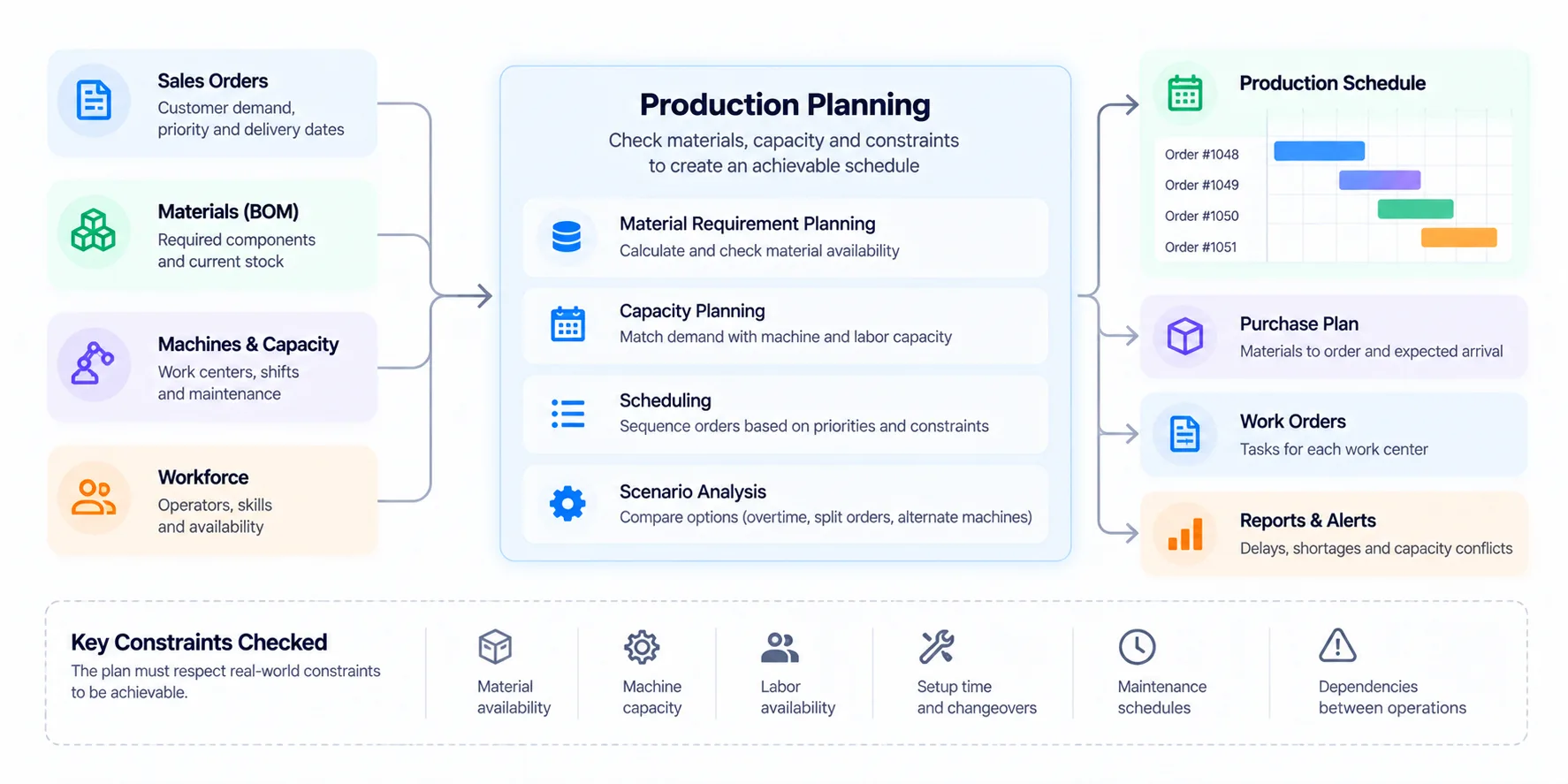
The important number isn't 120.
It's the 20-hour shortfall against realistic available capacity.
A scheduling system should identify that conflict before the production plan is released.
What can the planner do?
The software can help compare alternatives:
- Move eligible work to another machine
- Authorize overtime where appropriate
- Adjust order priorities
- Split an order into production batches
- Outsource an operation
- Negotiate a more realistic delivery date
Each option has a cost, operational consequence, or customer impact.
The software should make those tradeoffs visible rather than silently choosing one.
Infinite vs finite capacity scheduling
Infinite capacity scheduling places work on a timeline without necessarily restricting the amount assigned to each resource.
Finite capacity scheduling respects defined resource limits and avoids scheduling more work than those resources can handle at the same time.
For manufacturers dealing with bottlenecks, finite capacity scheduling is often the more useful approach.
What a Production Planner Actually Needs
Instead of starting with a long list of generic modules, consider the planner's working day.
At 9 AM: Review incoming orders
The planner sees new orders, requested delivery dates, priorities, and current commitments.
Orders with missing information are flagged.
At 10 AM: Check material readiness
The system compares requirements with available and incoming materials.
A shortage is linked to the orders it affects.
At 11 AM: Generate a proposed schedule
The planner evaluates available machines, production routes, changeovers, and work-center capacity.
At 2 PM: Respond to a machine breakdown
A machine becomes unavailable.
The software identifies affected operations and helps the planner evaluate revised schedules.
At 4 PM: Publish the updated plan
Authorized teams receive the latest approved production schedule.
Previous plan versions remain available for comparison.
Core capabilities for the first release
- Included: Sales order and production demand import
- Included: Bills of materials and production routes
- Included: Work-center and machine capacity
- Included: Shift calendars and planned downtime
- Included: Material availability checks
- Included: Production order scheduling
- Included: Bottleneck and conflict alerts
- Included: Schedule approval and version history
- Included: Planned vs actual production reporting
- Included: ERP and inventory integration
Advanced optimization, predictive analytics, and complex scenario simulation can be added when the underlying data is reliable.
A Real Factory Reduced Lead Times Dramatically
A particularly relevant example comes from the US National Institute of Standards and Technology's Manufacturing Extension Partnership.
Stainless Works, a manufacturer of stainless-steel exhaust systems and automotive components, worked with Ohio-based manufacturing support organization MAGNET to improve scheduling and capacity planning.
The project revealed that inaccurate production routings were preventing the company's ERP system from reflecting actual capacity.
After correcting routing data and improving work-center scheduling, the company identified welding as a critical bottleneck and changed its planning approach.
According to the published NIST case study, the results included:
| Reported Outcome | Result |
|---|---|
| Production lead time | Reduced from 12–14 weeks to 5 weeks |
| Increased or retained sales | $250,000 |
| Cost savings | $50,000 |
These figures belong to the documented Stainless Works project and should not be treated as guaranteed outcomes for other manufacturers.
The lesson isn't simply to buy better software
The case demonstrates something more fundamental:
Even an existing ERP can produce poor schedules when its production data doesn't represent reality.
Correct routings, realistic operation times, and well-defined work centers matter as much as the scheduling interface.
Before investing in a custom platform, manufacturers should examine the quality of their production data.
Architecture: Connect Planning to Reality
A custom planning platform should not become another isolated system that requires employees to copy data manually.
It should connect the systems that already hold important manufacturing information.
Important integration decisions
ERP integration: Where do orders, inventory balances, and purchasing information originate?
Machine availability: How are maintenance windows, breakdowns, and shifts recorded?
Production feedback: How does the planner know whether an operation actually started or finished?
Data ownership: Which system is responsible for the official order, inventory, and production records?
Scheduling rules: Can planners explain why an order received a particular slot?
Avoid the black-box scheduling problem
An automatically generated schedule can look impressive while being difficult to trust.
Planners need to understand the constraints behind recommendations.
For example:
Order 1048 cannot start on Tuesday because Machine C is unavailable and Material X is expected on Thursday.
An understandable explanation is often more useful than an unexplained optimization score.
Warning
Do not automate production commitments using incomplete inventory balances, outdated routings, or unreliable machine calendars. Incorrect input data can make a sophisticated scheduling algorithm confidently produce an unusable plan.
Calculate the Value of Better Planning
A manufacturing software investment should be evaluated against actual operational improvements.
Suppose a factory has four production planners.
Each spends three hours per day manually updating schedules, reconciling spreadsheets, and communicating changes.
Assume 22 working days per month.
4 planners × 3 hours × 22 days = 264 hours per month
If improved software reduces this manual work by 50%, the factory releases approximately 132 hours of planning capacity monthly.
At an illustrative fully loaded labor cost of ₹500 per hour:
132 hours × ₹500 = ₹66,000 per month
That's equivalent to ₹7.92 lakh of annual labor capacity.
This is a hypothetical calculation, not a guaranteed financial saving. The business may redeploy the time rather than reduce payroll.
Don't measure only planning time
A better production planning system may also influence:
- On-time delivery
- Production lead time
- Work-in-progress inventory
- Machine utilization
- Changeover time
- Overtime caused by schedule changes
- Expedited purchasing costs
- Order rescheduling frequency
Choose a few baseline metrics before implementation and measure them again after rollout.
Development Cost and Implementation Roadmap
Custom production planning software varies substantially in complexity.
A straightforward production calendar is very different from a finite-capacity scheduling engine managing hundreds of machines, thousands of operations, and multiple factories.
Illustrative development budgets in India
| Scope | Estimated Development Cost |
|---|---|
| Production orders and basic scheduling | ₹5–10 lakh |
| Material and capacity planning | ₹10–22 lakh |
| Advanced scheduling with ERP integration | ₹22–45 lakh |
| Multi-factory optimization platform | ₹45 lakh–₹1 crore+ |
These are illustrative 2026 planning estimates, not independently verified market averages or quotations.
Actual costs depend on scheduling complexity, data quality, integrations, reporting requirements, and deployment scope.
A phased approach that reduces risk
Phase 1: Understand the factory
Document production routes, work centers, shift calendars, setup times, and current planning practices.
Phase 2: Establish reliable inputs
Clean order data, bills of materials, inventory records, and machine capacity information.
Phase 3: Build a focused planning MVP
Support one production area or product family with scheduling, conflict detection, and planner approval.
Phase 4: Connect execution feedback
Integrate shop-floor updates and compare planned versus actual production.
Phase 5: Expand optimization
Introduce advanced sequencing, multi-factory planning, and scenario analysis where justified.
Build or buy?
Established APS products can be the better option when their scheduling models fit your factory and integrate effectively with existing systems.
Custom development becomes attractive when your production process has specialized constraints, unusual routing rules, or integration requirements that standard software cannot support economically.
A hybrid solution can also work: retain an existing ERP and build a custom planning interface or specialized scheduling service.
How Software Studio Pro Can Help
Software Studio Pro develops custom business applications, backend platforms, workflow automation, and system integrations.
For manufacturers, that can include production scheduling dashboards, material readiness checks, capacity planning tools, work-order workflows, and ERP integrations.
We focus on understanding the factory's actual constraints before recommending architecture or automation.
The goal isn't simply a faster schedule. It's a production plan your business can actually deliver.
FAQ
What is production planning software?
Production planning software helps manufacturers coordinate demand, materials, capacity, production orders, and schedules so products can be manufactured and delivered efficiently.
What is the difference between MRP and APS?
MRP focuses on calculating material requirements and timing. APS focuses on planning and scheduling production while considering resource constraints such as machines, labor, and materials.
Can production planning software integrate with ERP?
Yes. A custom planning application can exchange orders, inventory, purchasing information, and production updates with an ERP through supported APIs, files, or integration services.
How much does custom production planning software cost?
Illustrative budgets in India may begin around ₹5–10 lakh for basic planning systems. Advanced scheduling platforms with complex constraints and integrations can cost significantly more.
Can production planning software reduce delivery delays?
It can help identify material shortages, capacity conflicts, and scheduling problems earlier. Actual improvements depend on data accuracy, operational processes, and how the organization responds to planning information.
Is custom production planning software suitable for SMEs?
Yes, but custom development is not always necessary. Smaller manufacturers should compare the cost and fit of existing solutions against their specific planning needs.
How long does production planning software take to develop?
A focused initial system may take several months. Advanced scheduling algorithms, ERP integrations, historical data migration, and multi-factory requirements can extend implementation.
Can production planning software work without an MES?
Yes. A planning application can operate using ERP data and manual production updates. However, reliable shop-floor feedback improves the accuracy of future plans and rescheduling decisions.
Ready to bring your business idea to life? Contact us today and let's build something amazing together!
Contact Us
READ MORE BLOGS
Custom Subscription Billing Software Development Guide
Published on - 28th October, 2026

Custom Travel Agency Booking Software Development Guide
Published on - 28th October, 2026
Custom Legal Case Management Software: A Practical Guide
Published on - 28th October, 2026
Custom Gym Management Software: Features, Cost & ROI
Published on - 28th October, 2026
Custom Quality Management Software Development Guide
Published on - 28th October, 2026