BLOG ON
Custom Healthcare Practice Management Software: What Clinics Really Need
PUBLISHED ON - 26th October, 2026 · 10 min read
PUBLISHED BY

Aditya Prem Sharma
Product Specialist
Custom Healthcare Practice Management Software: What Clinics
A patient books an appointment online, receives a confirmation, and arrives ten minutes early.
At reception, they're asked to fill out the same details again.
The doctor is running late, but nobody has updated the appointment queue. After the consultation, the patient waits at billing because the payment system doesn't know which services were provided.
Every department has software. So why does the experience still feel so disconnected?
This is the problem custom healthcare practice management software should solve.
Not by putting another dashboard in front of the receptionist, but by making appointments, patient registration, billing, staff schedules, and everyday clinic operations work together.
For a single-doctor practice, an existing subscription product may already do the job. For a growing healthcare business with multiple locations, specialized services, or complicated administrative workflows, the answer may be different.
The Most Expensive Problem Isn't Always Visible
Imagine a clinic manager reviewing yesterday's operations.
Revenue looks healthy. Appointments were nearly full. The staff worked throughout the day.
But a closer look reveals something else.
Patients called repeatedly to confirm their bookings. Reception entered the same information into two systems. Billing spent the evening reconciling transactions. Doctors waited for information that another department already had.
No single incident looks especially serious.
Together, they create a business that depends too heavily on people remembering things, forwarding messages, and correcting mistakes.
A clinic doesn't become more efficient simply because its paperwork moves onto a screen. The real improvement happens when information no longer needs to be carried manually between departments.
That distinction matters when deciding whether to purchase software, customize an existing product, or build something new.
A modern clinic might already have an electronic health record (EHR), accounting software, appointment booking, and a payment provider. Replacing everything could be expensive and unnecessary.
The better question is: Which parts of the patient's journey are still disconnected?
Follow One Appointment Through Your Clinic
Instead of starting with a long feature list, consider how a properly connected administrative system could handle an ordinary appointment.
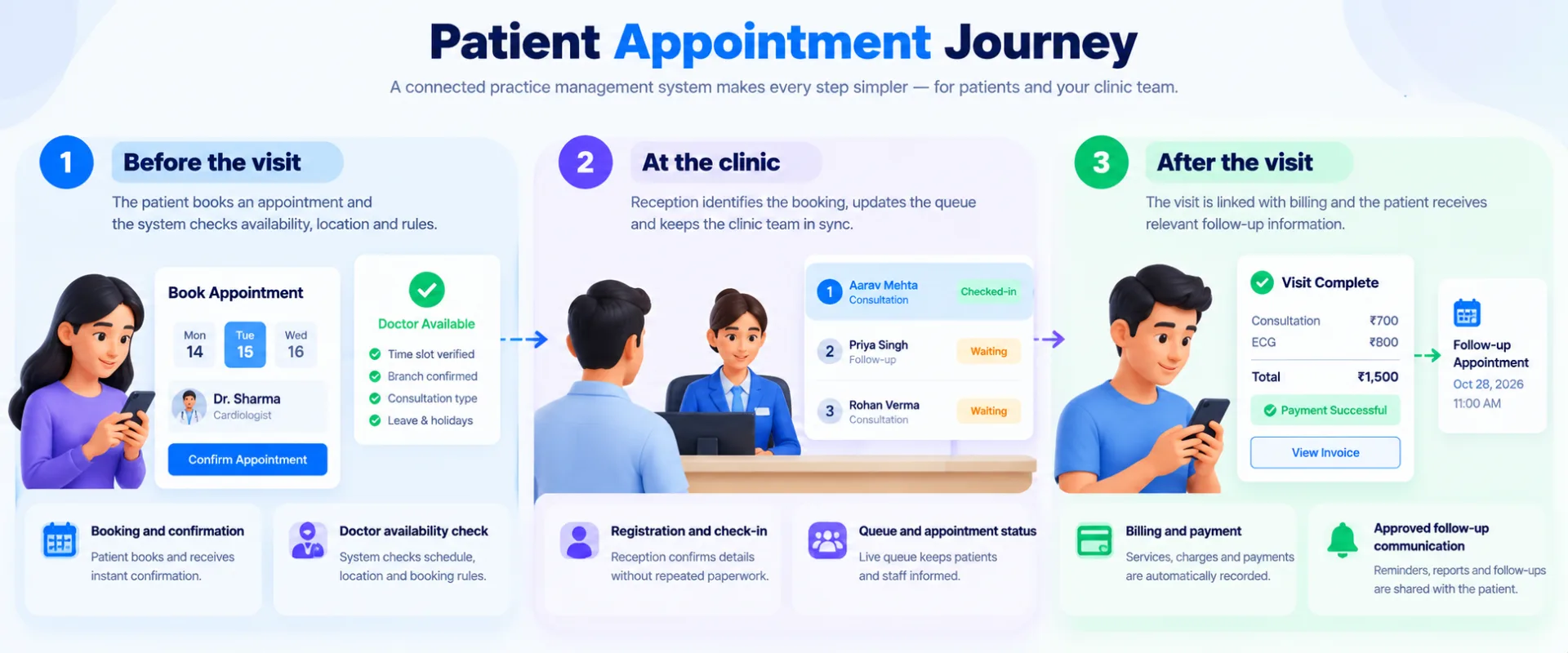
The booking should know the doctor's schedule
Suppose a specialist works at Branch A on Mondays and Branch B on Tuesdays.
An appointment system that simply displays available time slots isn't enough. It must understand location, consultation type, leave, holidays, and existing bookings.
It also needs to handle the awkward situations: a doctor running late, an emergency appointment, a patient requesting a different branch, or two people trying to reserve the last available slot.
Registration shouldn't start from zero
When the patient arrives, reception should be able to identify the booking and confirm the required information.
That doesn't mean every employee should see the patient's complete medical history.
A receptionist may need contact information and appointment status. Clinical records belong in appropriately controlled clinical systems.
Billing should understand the visit
Administrative systems can link approved service records, applicable charges, payment status, receipts, and refunds.
The system must also recognize that a successful payment and a successful payment notification are not necessarily the same thing.
If the payment gateway times out, the software shouldn't blindly create another charge.
These details rarely appear in marketing screenshots, but they determine whether clinic staff can trust the application.
Stop Trying to Build Everything Into One App
One of the biggest mistakes in healthcare software development is treating every healthcare system as interchangeable.
A practice management system is not necessarily an EHR, and neither is automatically a complete hospital management platform.
Practice management software (PMS) primarily handles administration: appointments, patient registration, staff scheduling, billing, and operational reporting.
Electronic health record software (EHR/EMR) primarily manages clinical information such as medical histories, consultation notes, diagnoses, and other records used by authorized healthcare professionals.
Hospital management systems (HMS) may cover broader hospital operations, including inpatient services, departments, and other specialized workflows.
A patient portal provides an approved interface for self-service activities.
These systems can work together without being replaced by a single enormous application.
An example: a diagnostic center expanding to five branches
The business already has laboratory software and accounting software.
Its biggest problem isn't laboratory testing. It's that patients cannot easily book services across branches, administrators struggle to coordinate availability, and management has no consolidated view of collections.
A sensible custom project might include:
- One patient booking experience across locations
- Branch-specific schedules and service availability
- Centralized administrative reporting
- Integration with the existing laboratory system
- Payment reconciliation
- Controlled access for branch managers
It would not automatically require rebuilding the laboratory information system or introducing new clinical decision-making functionality.
Tip
Before commissioning healthcare software, write down what your existing systems already do well. Protect those investments unless there is a strong reason to replace them.
What a Five-Provider Clinic Changed
There's a useful real-world example from a primary care practice in Greater Houston, Texas.
The practice had five providers and used a mixture of electronic forms and paper-based intake processes.
Staff distributed forms, checked for missing information, and helped transfer details into the clinical workflow.
Healthcare technology company Valhalla introduced a digital intake process. Patients received forms before their appointments, while clinic-owned tablets remained available for those who hadn't completed them.
The platform also supported documentation and coding workflows, so this was more than a simple online registration form.
According to Valhalla's published case study, the implementation produced the following results:
The provider also reported 720 minutes saved per physician per month and patient intake satisfaction above 90%.
These figures are vendor-reported outcomes from a specific implementation, not independent proof that other clinics will achieve similar results.
The interesting part isn't the software's feature count.
It's the decision to improve one frustrating process that affected patients, reception staff, and clinicians.
The case offers a useful lesson for any clinic considering custom software: find the work people repeat unnecessarily, then redesign that workflow before adding more features.
The Patient Portal Might Be Your Best Investment
Healthcare businesses often begin by asking for a large management dashboard.
But sometimes the most valuable improvement is on the patient's side.
Think about how many routine questions arrive by phone:
"Is the doctor available tomorrow?"
"Can I reschedule?"
"Did my payment go through?"
"Where can I find my invoice?"
A well-designed patient portal can answer many of these questions without requiring reception to intervene.
That doesn't mean building a mobile app for every clinic.
A responsive website may be enough for appointment booking, confirmation, rescheduling, and invoice access. A mobile app becomes more compelling when patients return frequently or genuinely benefit from persistent account features.
The portal needs to respect real people
Not every patient is comfortable using a smartphone.
Some patients prefer speaking to reception. Others may need help from an authorized caregiver.
A good system supports those realities instead of forcing every patient into the same digital journey.
For example, a patient might book by phone while reception enters the appointment into the same calendar used by online bookings.
The result is one operational schedule, regardless of how the patient made contact.
That is more useful than maintaining separate booking channels that staff must reconcile later.
Security Decisions Shape the Product
Imagine a receptionist accidentally opening a clinical record they were never supposed to access.
Or a branch manager downloading sensitive patient information that isn't relevant to their job.
These aren't merely technical bugs. They are failures in how the system was designed.
Healthcare software should establish access boundaries before the interface is built.
Who needs to see what?
| User | Typical Administrative Access |
|---|---|
| Receptionist | Bookings, check-in, necessary registration details |
| Billing executive | Approved charges, invoices, payment status |
| Clinic manager | Schedules, staffing, operational reports |
| Authorized clinician | Relevant clinical information through approved systems |
| System administrator | Necessary technical controls, not unrestricted clinical access by default |
Actual permissions depend on the organization's responsibilities, applicable laws, and documented policies.
The software should also support appropriate audit trails, secure authentication, encryption, backup and recovery, and incident response procedures.
India, ABDM, and international requirements
For healthcare organizations in India, the Ayushman Bharat Digital Mission (ABDM) provides a framework for interoperable digital health services.
Its health information exchange approach emphasizes patient consent. Applications seeking relevant ABDM integrations must meet applicable technical and security requirements.
The Ministry of Health and Family Welfare has described sandbox validation and security audits as part of ABDM integration.
Organizations must separately assess applicable Indian data protection and healthcare requirements.
For US healthcare organizations and relevant service providers, HIPAA may apply. Its Security Rule requires appropriate administrative, physical, and technical safeguards for electronic protected health information.
Warning
No development agency can make an application compliant merely by adding encryption or a privacy policy. Legal applicability, organizational procedures, technical controls, contracts, and specialist validation all matter.
Clinical functions, regulated integrations, and healthcare compliance requirements should be reviewed with qualified specialists.
When Does Custom Development Make Sense?
Let's compare two very different businesses.
Clinic A: one location, three doctors
Appointments are straightforward. Billing follows a standard process. The clinic doesn't require unusual integrations.
A reputable ready-made product may be the best option.
The clinic can begin using software quickly without taking on the cost and responsibility of developing its own platform.
Clinic B: twelve locations, several specialties
Doctors rotate between branches. Some services require advance payments. Each location has different scheduling rules. The business already uses clinical and accounting systems but cannot get consistent administrative reports.
This is where custom software becomes more interesting.
The business may need to connect existing tools, introduce branch-specific workflows, and provide management with a unified operational view.
The difference isn't simply that Clinic B is larger.
Its operational requirements may no longer fit neatly into a standard subscription product.
Three questions worth asking
What are we paying employees to do manually?
Repeated data entry, spreadsheet reconciliation, and routine coordination are candidates for improvement.
What is difficult to change in our existing software?
If every new branch or service requires awkward workarounds, customization may have meaningful value.
Would integration solve the problem without replacing everything?
Often, connecting two dependable systems is better than rebuilding both.
The Cost of Building the Wrong Thing
A clinic may request a patient app, staff app, management dashboard, EHR, billing platform, and AI assistant in one project.
That sounds comprehensive.
It also creates an enormous number of dependencies before anyone has proven that the core workflow works.
A more practical approach is to identify the smallest useful operational release.
For example, a multi-branch clinic could begin with shared scheduling, registration, staff permissions, billing visibility, and a management dashboard.
Only after staff have tested those workflows would the business introduce patient self-service, additional integrations, and more sophisticated automation.
Illustrative development budgets in India
These are planning scenarios for 2026, not verified market averages or fixed quotations.
| Scope | Illustrative Budget |
|---|---|
| Booking system with admin interface | ₹4–8 lakh |
| Clinic administration and billing platform | ₹8–18 lakh |
| Multi-branch practice management | ₹18–35 lakh |
| Complex integrations and enterprise workflows | ₹35–70 lakh+ |
Clinical functionality, specialized validation, security assessments, migration, third-party licenses, infrastructure, and maintenance can increase costs substantially.
The better budgeting question is not "How much does a healthcare app cost?"
It's "Which business process must work reliably at launch, and what will it cost to build and operate that process?"
Consider the ongoing cost
A custom system needs more than its initial development budget.
Plan for hosting, monitoring, backups, software updates, security reviews, integration maintenance, staff training, and support.
A cheaper launch is not necessarily a cheaper five-year system.
And if a ready-made product already meets your requirements, custom development may not deliver enough additional value to justify its cost.
What Would You Fix Before Monday Morning?
Here's a practical exercise for clinic owners and operations managers.
Ask reception, billing, and branch managers to describe the last five problems that interrupted their work.
Don't ask them what features they want.
Ask what happened.
Perhaps a patient was booked twice. A refund was delayed. A doctor changed branches and the schedule wasn't updated. Or a report required three spreadsheets and two phone calls.
Look for repeated patterns.
Then identify which of those problems could be solved by clearer procedures, better configuration of existing tools, or a small integration.
Only after that should you define the custom software requirements.
This approach produces a much more useful development brief than a generic list of fifty features.
It also makes success easier to measure.
Instead of celebrating that the new dashboard has launched, you can ask whether scheduling conflicts decreased, payment reconciliation became faster, or staff spend less time repeating administrative work.
Building Healthcare Software With Software Studio Pro
At Software Studio Pro, we help businesses develop custom software around their actual operations.
For healthcare organizations, that may mean an appointment platform, multi-branch administrative dashboard, patient portal, billing integration, mobile application, or a secure connection between existing systems.
Our role is software engineering: understanding workflows, designing interfaces and backend services, implementing approved requirements, testing the application, and supporting it after launch.
Healthcare professionals and qualified clinical or compliance specialists must guide and validate requirements that involve patient safety, clinical records, or regulated activities.
You don't need to arrive with a finished technical specification.
A useful starting point is simply explaining where your current clinic operations become difficult.
If your team spends too much time making disconnected systems work together, that's a problem worth discussing before building another application.
FAQ
What is custom healthcare practice management software?
It is software developed around a healthcare organization's administrative workflows, such as appointments, registration, billing, staffing, and reporting.
Is practice management software different from an EHR?
Yes. Practice management software primarily supports administration, while an EHR manages clinical health information and related workflows.
Can custom clinic software connect multiple branches?
Yes. It can support shared scheduling, branch-specific permissions, operational reporting, and integration with existing systems.
Is a mobile app necessary for every clinic?
No. A responsive web portal may be sufficient for many patient and staff workflows.
Can a clinic keep its existing EHR?
Often, yes. A new administrative application may be able to integrate with the existing EHR, depending on available interfaces and permissions.
How much does custom clinic management software cost?
A focused booking application may have an illustrative budget of ₹4–8 lakh in India, while larger multi-branch or heavily integrated systems may cost considerably more.
How long does development take?
A focused administrative MVP might take three to five months. Complex integrations, migrations, security requirements, and clinical validation can extend the timeline.
Should a small clinic build its own software?
Usually only when standard products cannot adequately support its requirements. For straightforward scheduling and billing, ready-made software may be more economical.
Ready to bring your business idea to life? Contact us today and let's build something amazing together!
Contact Us
READ MORE BLOGS
Custom Field Service Management Software Development
Published on - 26th October, 2026
Custom B2B Order Management System Development
Published on - 26th October, 2026
Manufacturing Execution System (MES) Development
Published on - 26th October, 2026
Custom Warehouse Management Software Development
Published on - 26th October, 2026
Enterprise Workflow Automation Across ERP and CRM
Updated on - 23rd October, 2026